
As explained in Why are trailing zeros not showing up / decimal places not displayed as imported? our standard EDD has a NumberDecimals field that the laboratory can populate when importing data. If this field is used, Enviro Data stores that information in that field in the Analyses table for use when the result is displayed. If this field is not populated, it calculates the number of decimals from the Value field and stores that number.
For better number formatting, in Display Options select the “Auto” Number of Decimals option, and check Extra Zeros Converted Values..
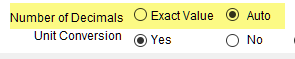
Options for Number of Decimals in the Display/Graphing Options form in the Viewer
For the Crosstab Export, Value and Flag is always stored as text and this is recommended. However, the Value (only) field is numeric. If you are depending on the Value field only, this can be problematic because Excel does not store or display trailing zeros in a numeric field so ensure that the Enviro Data Column selection is set to Value and Flag.

The Value Fields tab --> Enviro Data Column section on the Crosstab Wizard form.
When calculating statistics using the crosstab export select the “User-Specified” Decimal Precision option and enter a number into the Number Decimals text box or try using the “Max # Decimals for Results” option.

Statistics Tab in the Crosstab Wizard form.
If these suggestions don’t help the source of the formatting errors may be in the crosstab template file.